
How to Remove Duplicate Records From SQL Table

Syntax :

set nocount on
set rowcount
1
while 1=1
begin
delete from Table_Name
where Column_Name1 IN
(
select Column_Name1
from Table_Name
group by Column_Name1
count(*)>1
)
if @@ROWCOUNT=0
break;
end
set rowcount 0

-- Create a table as Persons
CREATE TABLE [dbo].[Persons]
(
PersonID int ,
LastName varchar(25),
FirstName varchar(25),
Address varchar(25),
City varchar(25)
)

insert into Persons
values(1,'Billa','Ravi','Giddalur','Ongole')

insert into Persons
values(2,'A','Raju','B pata','Guntur')

insert into Persons
values(2,'A','Raju','B pata','Guntur')

insert into Persons
values(3,'B','Ranga','Rachrla','Nellor')

insert into Persons
values(4,'c','Raky','Komarolu','Cudapa')

insert into Persons
values(4,'c','Raky','Komarolu','Cudapa')

insert into Persons
values(5,'D','Roja','KSPalli','Ongole')


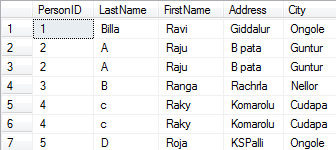
SELECT * FROM [Persons]


-- Find duplicate records
SELECT [PersonID],[LastName],[FirstName],[Address],[City],count(*) as CountOf
from [Persons]
group by [PersonID],[LastName],[FirstName],[Address],[City]
having count(*)>1


-- Delete duplicate records
SET NOCOUNT ON
SET ROWCOUNT
 1
WHILE 1 = 1
BEGIN
DELETE FROM [Persons]
WHERE    [PersonID] IN 
(
SELECT  [PersonID]
FROM    [Persons]
GROUP BY [PersonID]
HAVING COUNT(*) > 1
)
IF @@Rowcount = 0
BREAK ;
END
SET ROWCOUNT 0


SELECT * FROM [Persons]


Comments

Popular posts from this blog

SSRS INTERVIEW QUESTIONS

Q: What is SSRS? Ø   SSRS or SQL Server Reporting Service is a server-based report generation software systems from Microsoft and is part of Microsoft BI. Ø   It is used for preparing and delivering interactive and variety of reports. Ø   It is administered through an web based interface. Ø   Reporting services utilizes a web service interface for supporting and developing of customized reporting applications. Ø   SSRS lets you create very rich reports (Tabular/Graphical/Interactive) from various datasources with rich data visualization (Charts, Maps, sparklines) Ø   SSRS allows are reports to be exported in various formats (Excel, PDF, word etc) Q: Explain SSRS Architecture? Reporting services architecture comprises of integrated components. It is a multi-tiered, included with application, server and data layers. This architecture is scalable and modular. A single installation can be used across multiple computers. It includes the fo...

Exception deserializing the package "The process cannot access the file because it is being used by another process."

TITLE: Microsoft Visual Studio ------------------------------ Failed to start project ------------------------------ ADDITIONAL INFORMATION: Exception deserializing the package "The process cannot access the file 'E:\SSASCube\HistoricalDataLoad\HistoricalDataLoad\bin\Development\HistoricalDataLoad.ispac' because it is being used by another process.". (Microsoft.DataTransformationServices.VsIntegration) ------------------------------ The process cannot access the file 'E:\SSASCube\HistoricalDataLoad\HistoricalDataLoad\bin\Development\HistoricalDataLoad.ispac' because it is being used by another process. (mscorlib) ------------------------------ BUTTONS: OK ------------------------------ While running SSIS package i got the error “The process cannot access the file ‘*.ispac’ because it is being used by another process”. I tried to close SSDT and run it again but, I still got the same error while compiling. Then, after searching over internet, I got...

Failed to execute the package or element. Build errors were encountered

Error: TITLE: Microsoft Visual Studio ------------------------------ Failed to execute the package or element.   Build errors were encountered. For more information, see the Output window. ------------------------------ BUTTONS: OK ------------------------------   Solution: We tried to close SSDT and run it again but, we still got the same error while running SSIS package. Then, we need to follow bellow solution: Step 1: Go to Task Manager–> Details Tab. Step 2: Locate the process “ DtsDebugHost.exe “. Kill this process. There might be multiple instances of this process. Kill all of them. Step 3: Rerun SSIS package