Posts

Showing posts with the label SQL Server 2022

Logical functions - GREATEST

Image
This function returns the maximum value from a list of one or more expressions. -- syntax: GREATEST ( expression1 [ , ...expressionN ] ) Arguments: expression1, expressionN A list of comma-separated expressions of any comparable data type. The GREATEST function requires at least one argument and supports no more than 254 arguments. Each expression can be a constant, variable, column name or function, and any combination of arithmetic, bitwise, and string operators. Aggregate functions and scalar subqueries are permitted. Return types: Returns the data type with the highest precedence from the set of types passed to the function. If all arguments have the same data type and the type is supported for comparison, GREATEST returns that type. Otherwise, the function will implicitly convert all arguments to the data type of the highest precedence before comparison and use this type as the return type. For numeric types, the scale of the return type will be the sam...

Logical functions - LEAST

Image
This function returns the minimum value from a list of one or more expressions. Syntax:   LEAST ( expression1 [ , ...expressionN ] ) Returns the data type with the highest precedence from the set of types passed to the function. Example 1: SELECT LEAST ( '6.62' , 3.1415 , N'7' )   AS  LeastVal ; GO Above query will returns least value as 3.145 Example 2: SELECT LEAST ( 'Glacier' , N'Joshua Tree' , 'Mount Rainier' ) AS  LeastString ; GO Above  example returns the minimum value from the list of character constants that is provided. Remarks All expressions in the list of arguments must be of a data type that is comparable and that can be implicitly converted to the data type of the argument with the highest precedence. Implicit conversion of all arguments to the highest precedence data type takes place before comparison. If implicit type conversion between the arguments isn't supported, the function will fail and return an error .

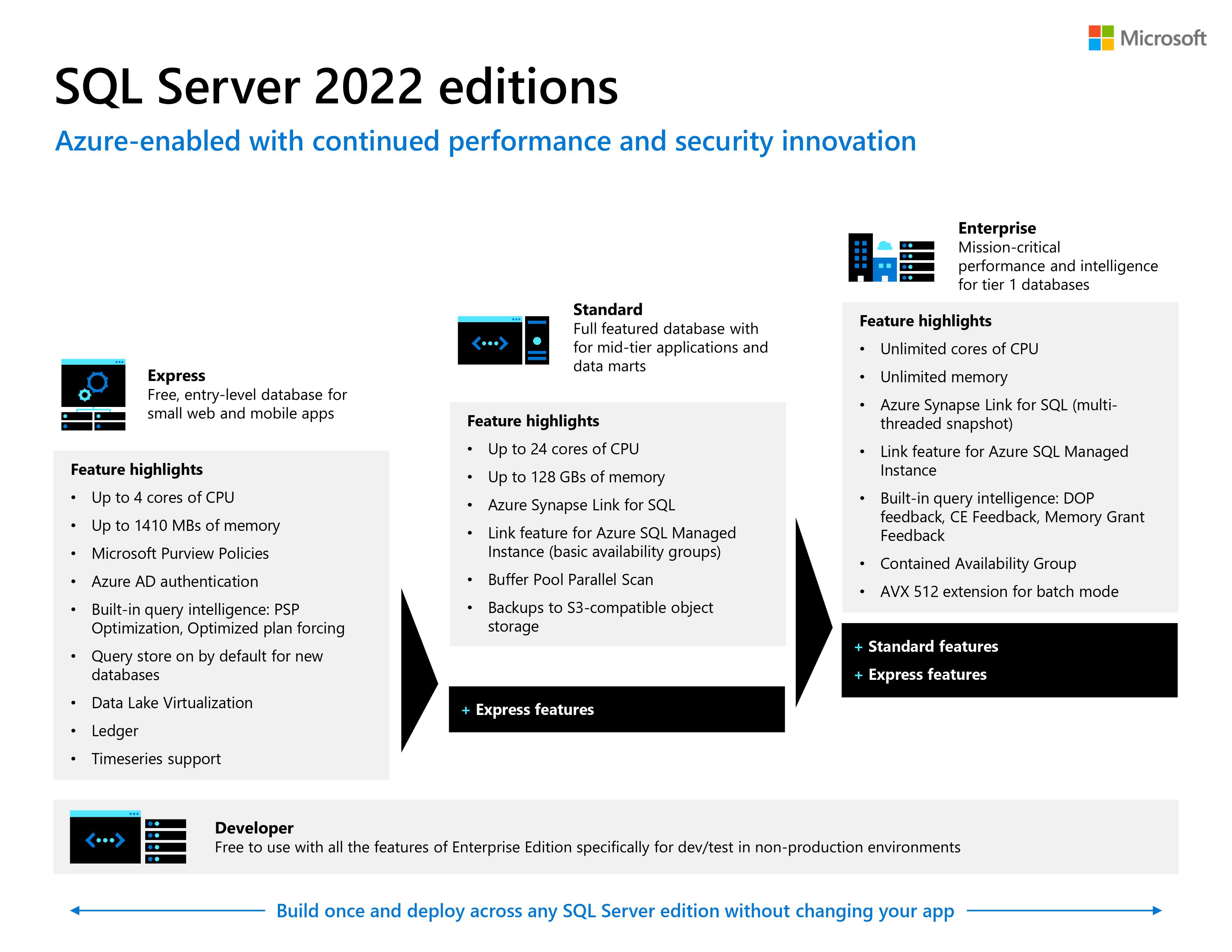
Available SQL Server 2022 editions

Image

SQL Server 2022 is now generally available

Image
Microsoft announced the general availability of SQL Server 2022, the most Azure-enabled release of SQL Server yet, with continued innovation across performance, security, and availability. This marks the latest milestone in the more than 30-year history of SQL Server. SQL Server 2022 is a core element of the Microsoft Intelligent Data Platform. The platform seamlessly integrates operational databases, analytics, and data governance. This enables customers to adapt in real-time, add layers of intelligence to their applications, unlock fast and predictive insights, and govern their data—wherever it resides. SQL Server 2022’s connections to Azure, including Azure Synapse Link and Microsoft Purview make it easier for customers to drive deeper insights, predictions, and governance from their data at scale. Azure integration also includes managed disaster recovery (DR) to Azure SQL Managed Instance, along with near real-time analytics, allowing database administrators to manage thei...

SQL Server 2022 - Disk space requirements

During installation of SQL Server, Windows Installer creates temporary files on the system drive. Before you run Setup to install or upgrade SQL Server, verify that you have at least 6.0 GB of available disk space on the system drive for these files. This requirement applies even if you install SQL Server components to a non-default drive. Actual hard disk space requirements depend on your system configuration and the features that you decide to install. The following table provides disk space requirements for SQL Server components. Feature Disk space requirement Database Engine and data files, Replication, Full-Text Search, and Data Quality Services 1,480 MB Database Engine (as above) with R Services (In-Database) 2,744 MB Database Engine (as above) with PolyBase Query Service for External Data 4,194 MB Analysis Services and data files 698 MB Reporting Services 967 MB Microsoft R Server (Standalone) 280 MB Reporting Services - SharePoint 1,203 MB Reporting Services Add-in for SharePoi...