Copilot in Power BI web modeling (preview)
Copilot in web modeling is an AI-powered assistant
integrated into the Power BI service semantic model experience. It helps model
authors analyze and improve their semantic models using natural language.
You can use natural language with Copilot alongside manual
editing to get recommendations or apply changes directly to your model, with
the flexibility to seamlessly switch between manual and AI-assisted edits.
Key capabilities
These capabilities represent just some of the key ways
Copilot can help you enhance your semantic models. You can also explore
additional actions beyond this list to further refine and optimize your model.
- Model
analysis and guided recommendations
- Identify
opportunities such as unclear structure or inconsistent naming
- Suggest
improvements aligned with modeling best practices to strengthen your
model’s design
- Schema
updates
- Rename
tables and columns
- Create
or modify relationships
- Generate
core DAX business measures using natural language (ex. totals, growth
metrics, or aggregations)
Where to access Copilot in web modeling
You can use Copilot in web modeling in the Power BI service:
- Open a
semantic model in Model view
- Switch
from Viewing mode to Editing mode using the dropdown
- Select Copilot from
the ribbon
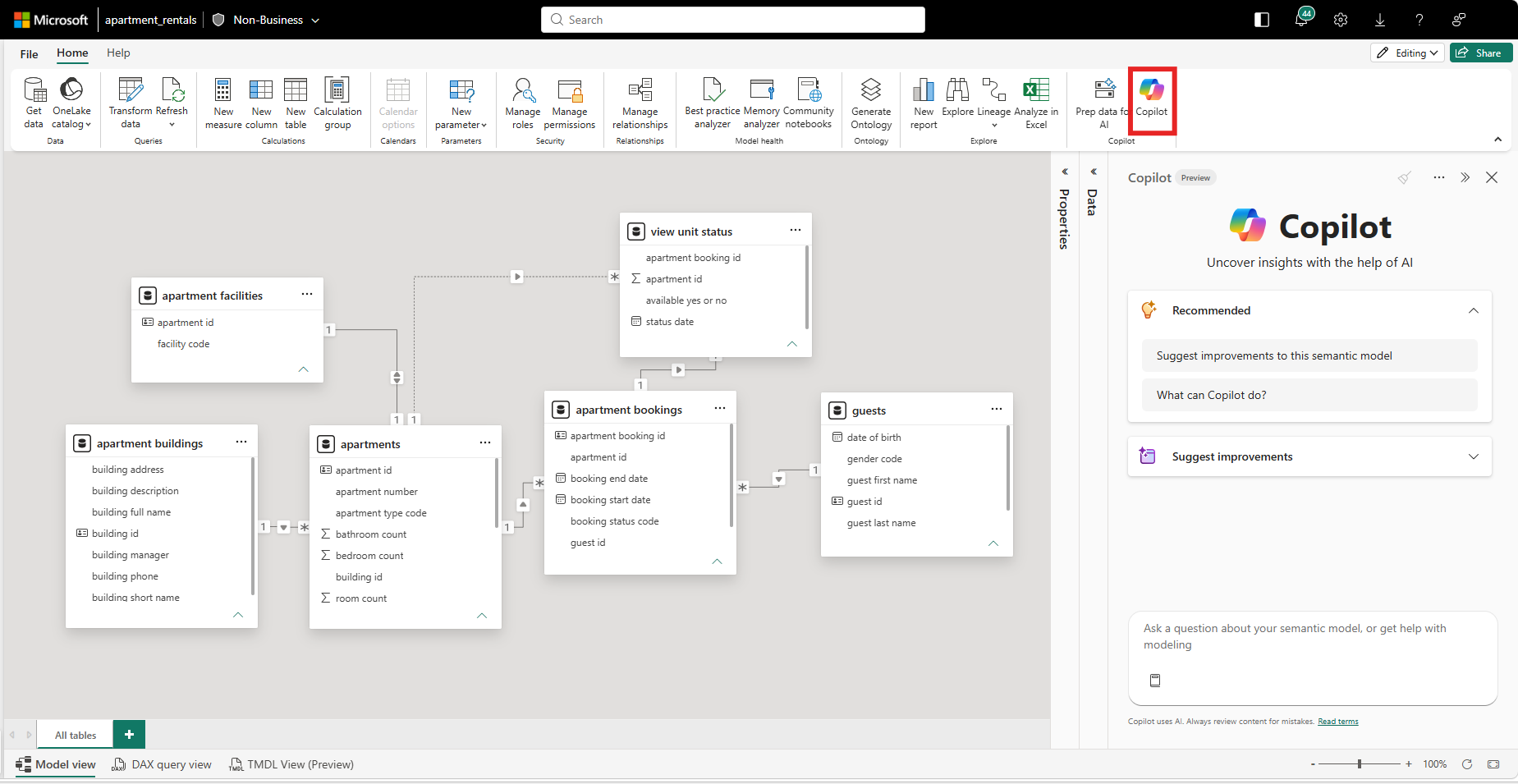
From the Copilot pane, you can start with suggested prompts
or enter your own questions to analyze or update your model.
Controlled model updates
Before responding to your first prompt, Copilot asks for
your permission before reviewing your model or suggesting changes. This is a
one-time permission prompt that appears at the start of each Copilot session to
ensure no updates are made without your approval. By providing approval, you
are consenting to Copilot making changes to the specific semantic model you
have opened during the full duration of the chat session for changes to be
made. Copilot may also run DAX queries to access data from your semantic model
in order to generate responses.
After you grant permission, Copilot creates a restore
checkpoint at the start of the session using semantic
model version history. You can use this checkpoint to revert the semantic
model back to its original state before Copilot changes were applied in that
specific chat session. This allows you to safely experiment with suggested
updates, review changes, and restore your model if needed.

Permissions and model access
Copilot in web modeling respects your existing Power BI
permissions. You can use Copilot to make changes only if you have permission
the Write permission to edit the semantic model.
Copilot’s editing access is limited to the model open in the
current Copilot pane. It can also retrieve schema information of the other
models you have access to, but those models are always read-only and cannot be
modified.
Considerations
As with any AI-assisted experience, review all suggested
changes to ensure they meet your requirements. Copilot uses the current model
context to interpret requests, so unclear or incomplete prompts may result in
less accurate suggestions.
Limitations
- Using
Copilot in web modeling to set prep data for AI currently isn't supported.
- Copilot
in web modeling is designed to help with semantic modeling tasks, and
requests outside this scope may not be supported.
- Copilot in web modeling is subject to Copilot for Power BI limitations and licensing requirements.
Comments
Post a Comment
Hi User,
Thanks for visiting My Blog and please provide your valuable feedback and subscribe for more updates. Please don't post any spam content or comments.
Thank You