
STRING_AGG (Transact-SQL)

Concatenates the values of string expressions and places separator values between them. The separator isn't added at the end of string.

Syntax:

    STRING_AGG ( expression, separator ) [ <order_clause> ]

<order_clause> ::= WITHIN GROUP ( ORDER BY <order_by_expression_list> [ ASC | DESC ] )

Arguments

expression
Is an expression of any type. Expressions are converted to NVARCHAR or VARCHAR types during concatenation. Non-string types are converted to NVARCHAR type.

separator
Is an expression of NVARCHAR or VARCHAR type that is used as separator for concatenated strings. It can be literal or variable.

<order_clause>
Optionally specify order of concatenated results using WITHIN GROUP clause:

WITHIN GROUP ( ORDER BY <order_by_expression_list> [ ASC | DESC ] )

<order_by_expression_list>

A list of non-constant expressions that can be used for sorting results. Only one order_by_expression is allowed per query. The default sort order is ascending.

Return Types

Return type depends on first argument (expression). If input argument is string type (NVARCHARVARCHAR), result type will be same as input type. The following table lists automatic conversions:

Input expression typeResult
NVARCHAR(MAX)NVARCHAR(MAX)
VARCHAR(MAX)VARCHAR(MAX)
NVARCHAR(1...4000)NVARCHAR(4000)
VARCHAR(1...8000)VARCHAR(8000)
int, bigint, smallint, tinyint, numeric, float, real, bit, decimal,
smallmoney, money, datetime, datetime2,
NVARCHAR(4000)

Example:
Sample data looks like bellow.
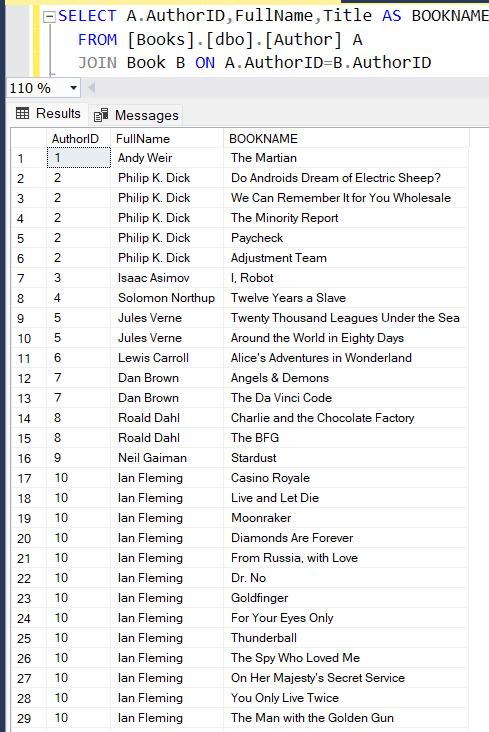
Expected Output like bellow.


Solution:


Comments

  1. Excellent content, Thanks for sharing this. It's pretty nice and very helpful content in this article.
    Leanpitch provides online training in Product Owner, everyone can use it wisely.
    ICP-ATF

    ReplyDelete
    Replies
    1. Thanks for your valuable feedback and please subscribe my blog for more updates.

      Delete
  2. Replies
    1. Thanks for your valuable feedback and please subscribe my blog for more updates.

      Delete
  3. Thanks for sharing the information with us, it was very informative.

    ReplyDelete
    Replies
    1. Thanks for your valuable feedback and please subscribe my blog for more updates.

      Delete
  4. You have a nice post, Thanks you! for business growth and improve, Check; Digital Marketing Course in Noida

    ReplyDelete
    Replies
    1. Thanks for your valuable feedback and please subscribe my blog for more updates.

      Delete

Post a Comment

Hi User,
Thanks for visiting My Blog and please provide your valuable feedback and subscribe for more updates. Please don't post any spam content or comments.
Thank You

Popular posts from this blog

SSRS INTERVIEW QUESTIONS

Q: What is SSRS? Ø   SSRS or SQL Server Reporting Service is a server-based report generation software systems from Microsoft and is part of Microsoft BI. Ø   It is used for preparing and delivering interactive and variety of reports. Ø   It is administered through an web based interface. Ø   Reporting services utilizes a web service interface for supporting and developing of customized reporting applications. Ø   SSRS lets you create very rich reports (Tabular/Graphical/Interactive) from various datasources with rich data visualization (Charts, Maps, sparklines) Ø   SSRS allows are reports to be exported in various formats (Excel, PDF, word etc) Q: Explain SSRS Architecture? Reporting services architecture comprises of integrated components. It is a multi-tiered, included with application, server and data layers. This architecture is scalable and modular. A single installation can be used across multiple computers. It includes the fo...

Exception deserializing the package "The process cannot access the file because it is being used by another process."

TITLE: Microsoft Visual Studio ------------------------------ Failed to start project ------------------------------ ADDITIONAL INFORMATION: Exception deserializing the package "The process cannot access the file 'E:\SSASCube\HistoricalDataLoad\HistoricalDataLoad\bin\Development\HistoricalDataLoad.ispac' because it is being used by another process.". (Microsoft.DataTransformationServices.VsIntegration) ------------------------------ The process cannot access the file 'E:\SSASCube\HistoricalDataLoad\HistoricalDataLoad\bin\Development\HistoricalDataLoad.ispac' because it is being used by another process. (mscorlib) ------------------------------ BUTTONS: OK ------------------------------ While running SSIS package i got the error “The process cannot access the file ‘*.ispac’ because it is being used by another process”. I tried to close SSDT and run it again but, I still got the same error while compiling. Then, after searching over internet, I got...

Failed to execute the package or element. Build errors were encountered

Error: TITLE: Microsoft Visual Studio ------------------------------ Failed to execute the package or element.   Build errors were encountered. For more information, see the Output window. ------------------------------ BUTTONS: OK ------------------------------   Solution: We tried to close SSDT and run it again but, we still got the same error while running SSIS package. Then, we need to follow bellow solution: Step 1: Go to Task Manager–> Details Tab. Step 2: Locate the process “ DtsDebugHost.exe “. Kill this process. There might be multiple instances of this process. Kill all of them. Step 3: Rerun SSIS package